
How do QR codes work?
The short answer
A QR code is a binary message your camera can read. The grid of black and white squares encodes data, while built-in structural markers tell the scanner how to orient the code, how it's formatted, and how to reconstruct any missing pieces.
The long answer
Back in the 1990s, Masahiro Hara and his team at Denso Wave were tasked with creating a new system for labeling automobile parts. The main drawback of the standard barcode system was that it could only represent ~20 alphanumeric characters. Car parts ended up with multiple labels, forcing employees to scan hundreds of barcodes every day.
Inspired by the design of the Go board, Hara went on to invent the QR code, and Denso Wave later waived patent rights for standardized QR Codes. Hara and his team not only made a superior automobile part inventory system, but also created one of the most widely used data tools in the world.
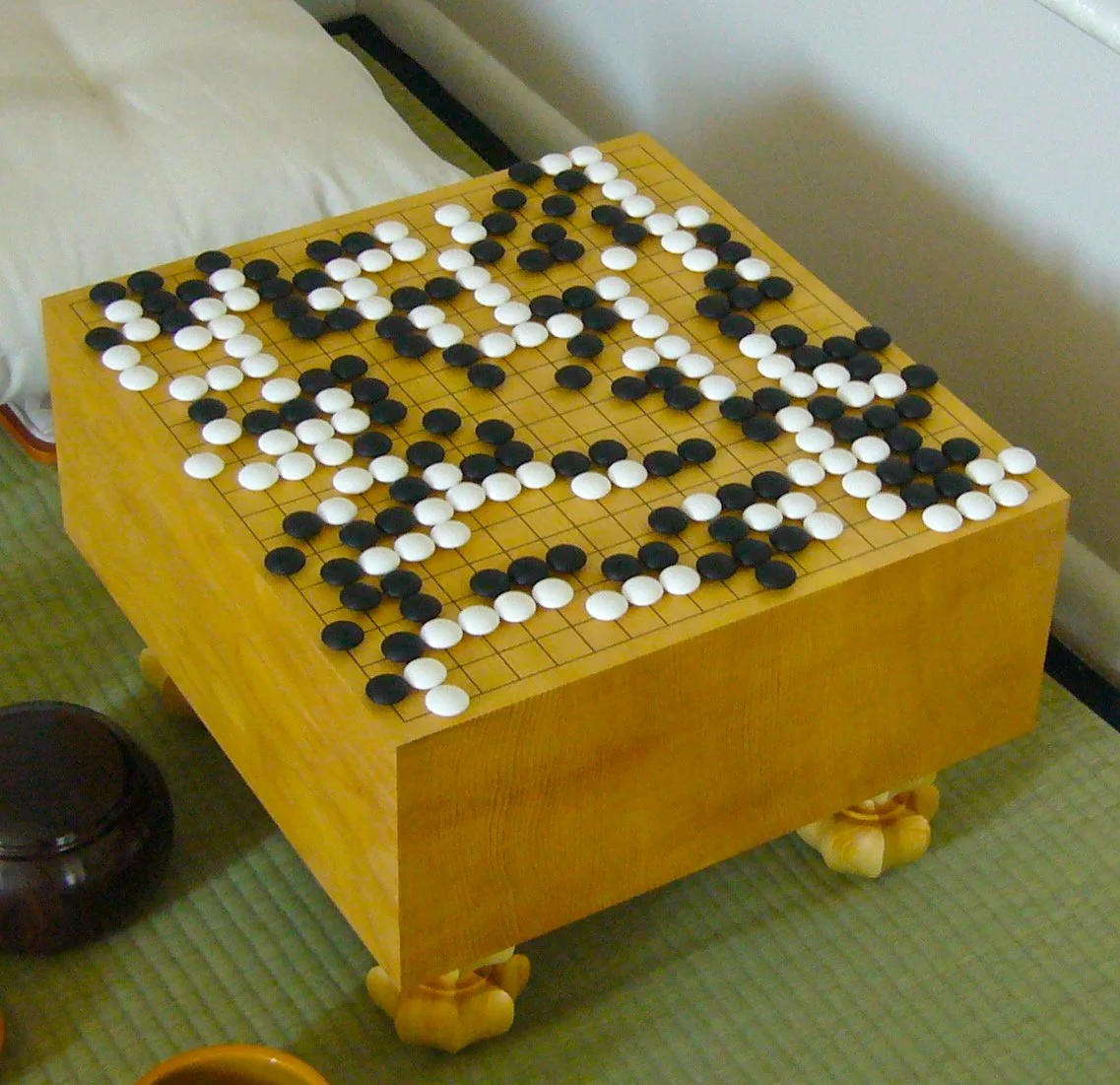
A Go board
"FloorGoban" by Goban1 is part of the public domain.
What is a QR code?
A QR (Quick Response) code is a grid of black and white squares that a scanner can interpret as bits. using image processing, with black squares representing "1" and white squares "0."
QR codes have a lot of advantages: they can be scanned from any direction, hold much more data than a traditional barcode, and can even still work with up to 30% of the code being damaged.
It's important to note that a QR code only stores encoded data. The device that reads the data recognizes what kind of content it is, and then decides what action to offer, like opening a URL, saving a contact, or joining Wi-Fi.
What are the different parts of a QR code?
A QR code may look like a random assortment of black and white squares, but there's a method to the madness. Here's a labeled image of QR code of todayyoushouldknow.com as an example.
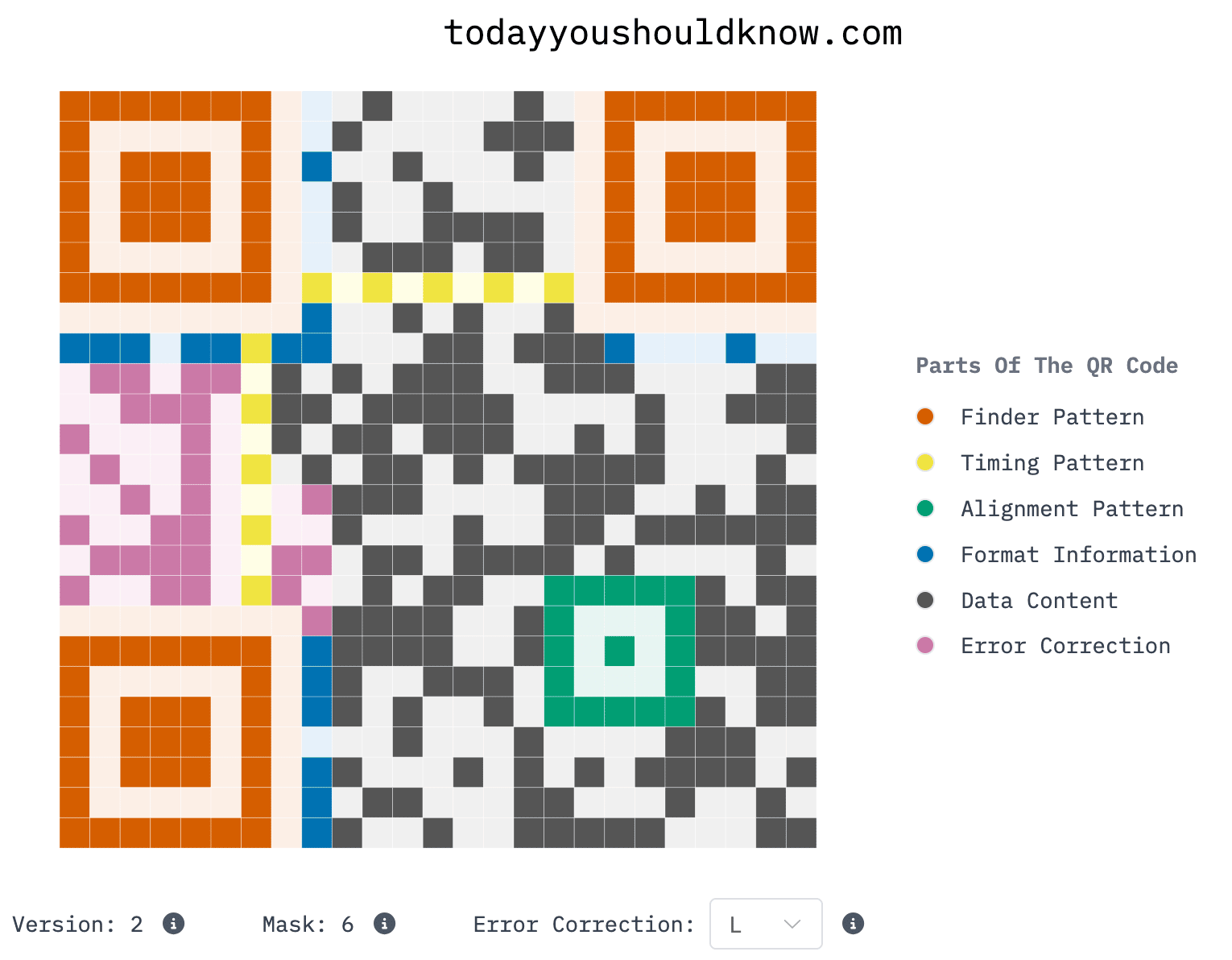
A QR code of todayyoushouldknow.com (Source: PerThirtySixty)
Each section of the QR code serves a distinct purpose: to help align the scanner, communicate the type and content of data, and add redundancies for error correction.
Finder Patterns
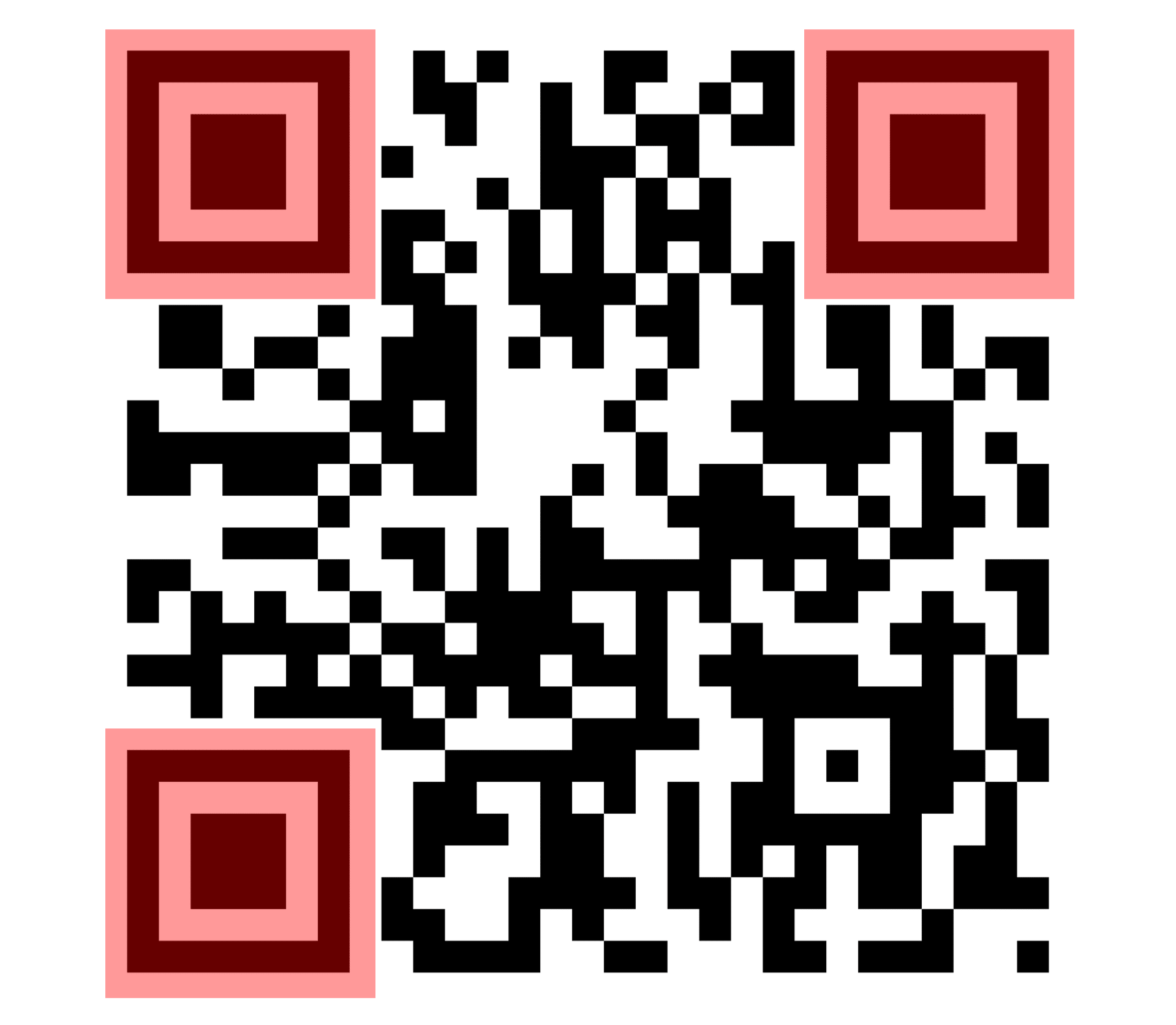
Likely the most recognizable element of a QR code's design, the three squares on a QR code are the finder patterns. The fourth corner is intentionally left empty to tell a scanner which way is "up." The QR code must be surrounded by a blank "quiet zone" to help scanners detect the finder patterns.
Timing Pattern
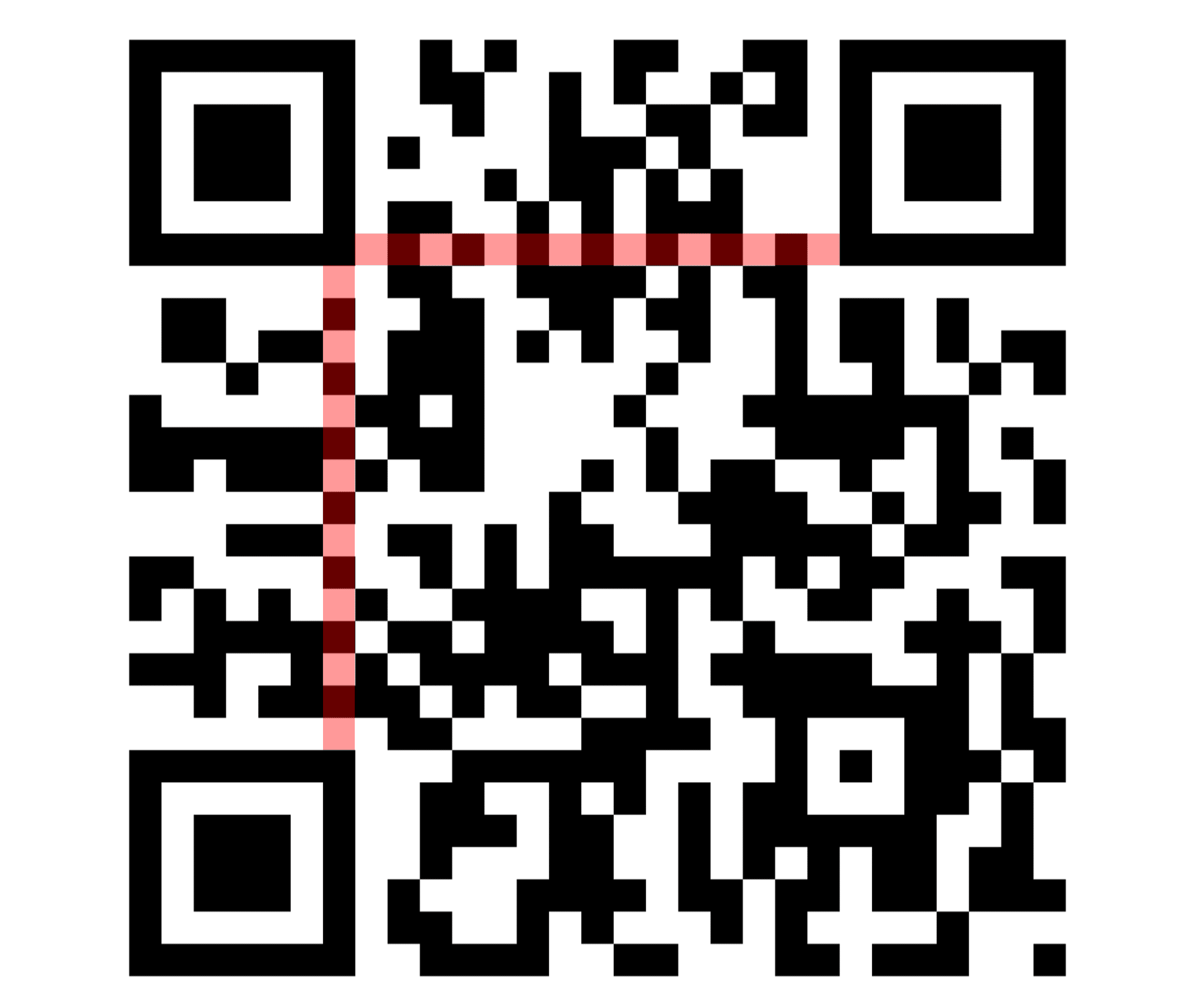
The timing pattern is a row and column of alternating black and white modules (squares that make up the QR code). It helps the scanner determine the size of each module.
Alignment Pattern
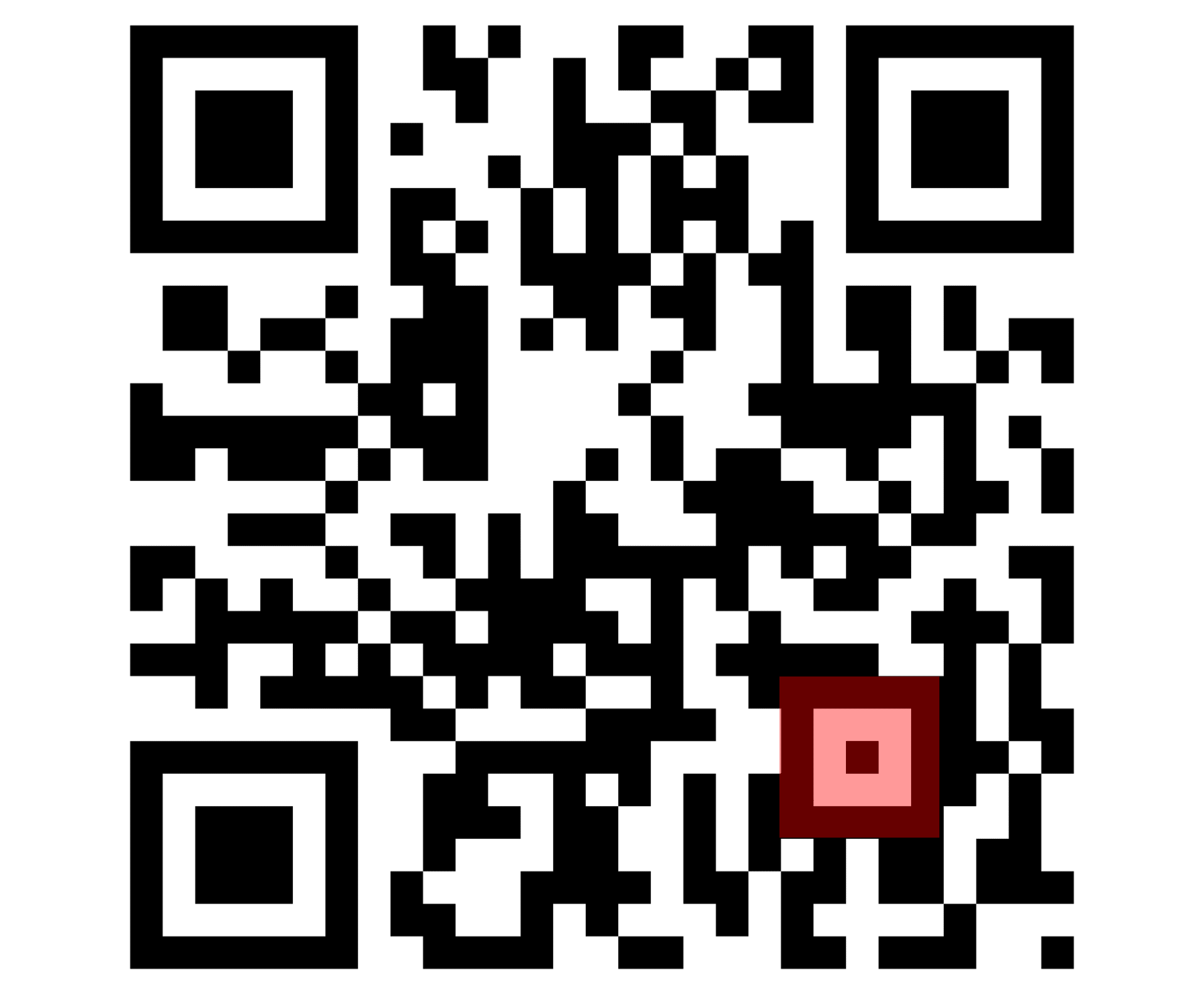
Depending on the size of the QR code, you may find one or more smaller squares in the design. These smaller squares, known as alignment patterns, help the scanner correct for distortion if the code is scanned at an angle or if the code is on a curved surface.
Format Information
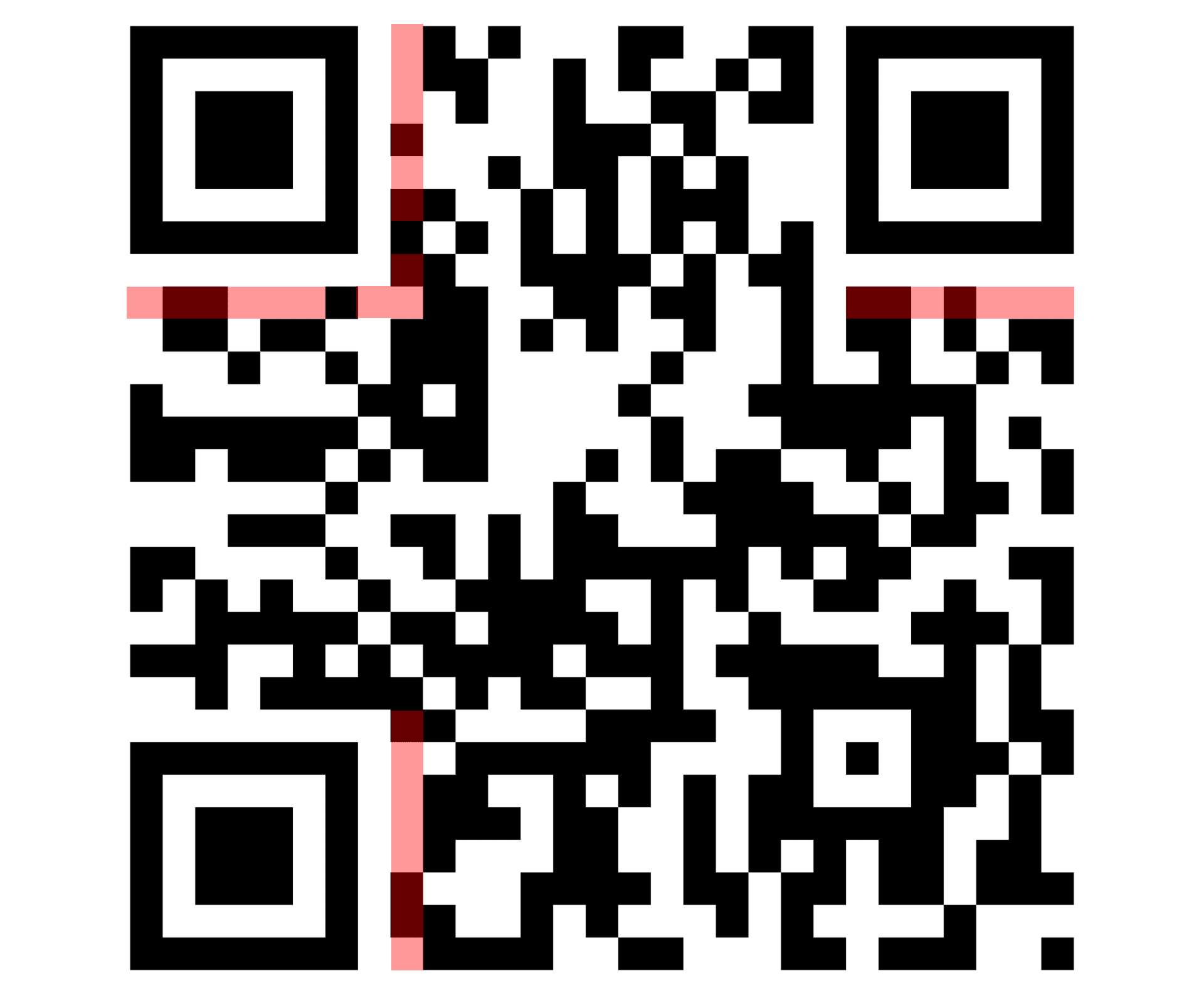
Format information tells the scanner key information about how the QR code is encoded. It contains the mask pattern and error correction level.
A mask pattern is a rule that tells the QR code to flip certain modules from black to white, or vice versa. This helps break up large blocks, stripes, or other patterns that could make the code harder for a scanner to read. The code also includes which mask was used, so the scanner can reverse it and recover the original data correctly.
Error Correction
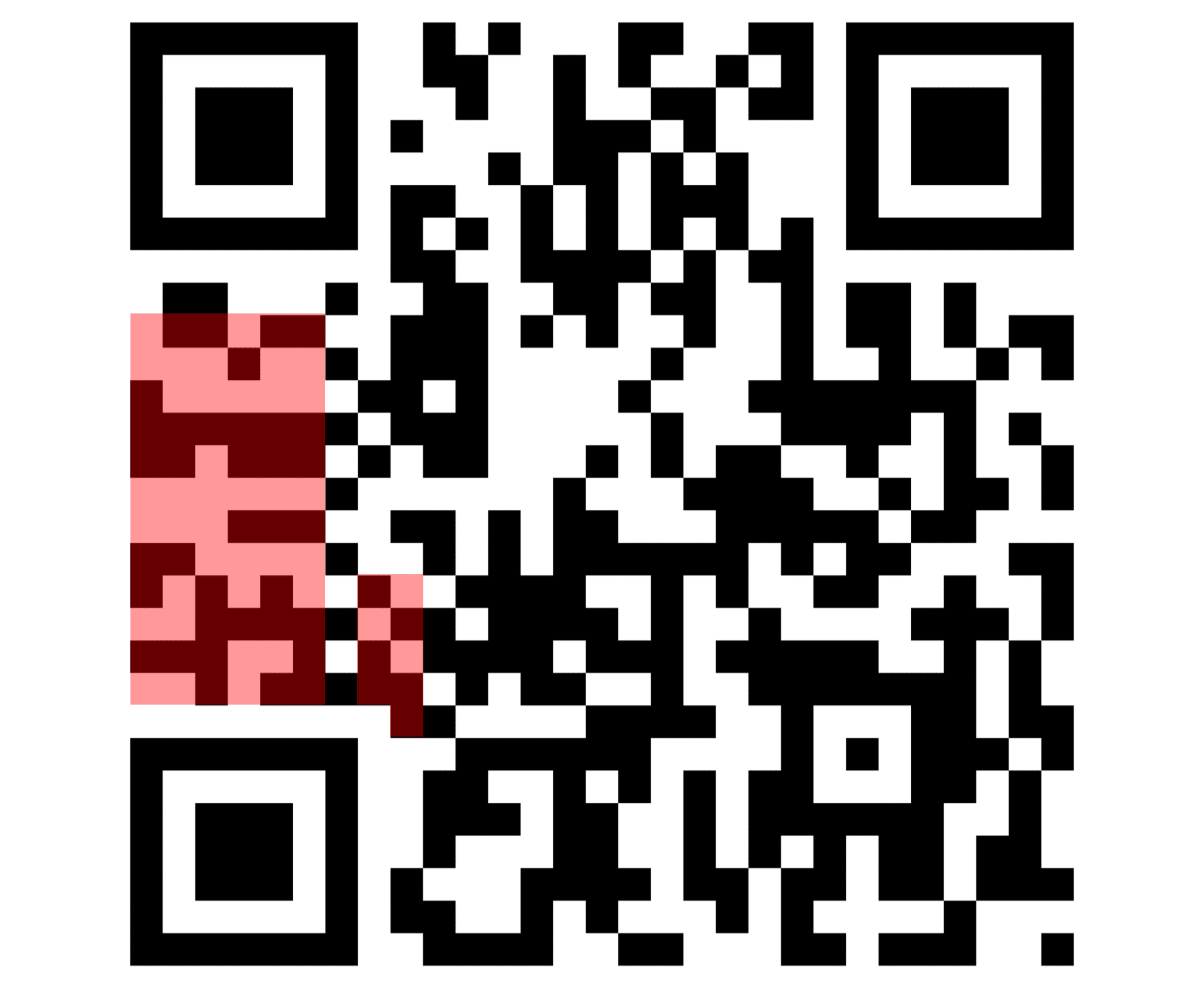
Depending on the level, error correction allows a QR code to still be read even if up to 30% of it is damaged or missing. This is how you often see QR codes with logos smack dab in the middle.
In basic terms, error correction adds backup data so a scanner can still recover data if it's damaged, blurry, or obscured. It uses a method called Reed-Solomon error correction, carefully calculated redundant data so the scanner can detect and reconstruct missing or corrupted pieces. If you want to dig into the math behind it, Veritasium has a great video on it.
Data Content
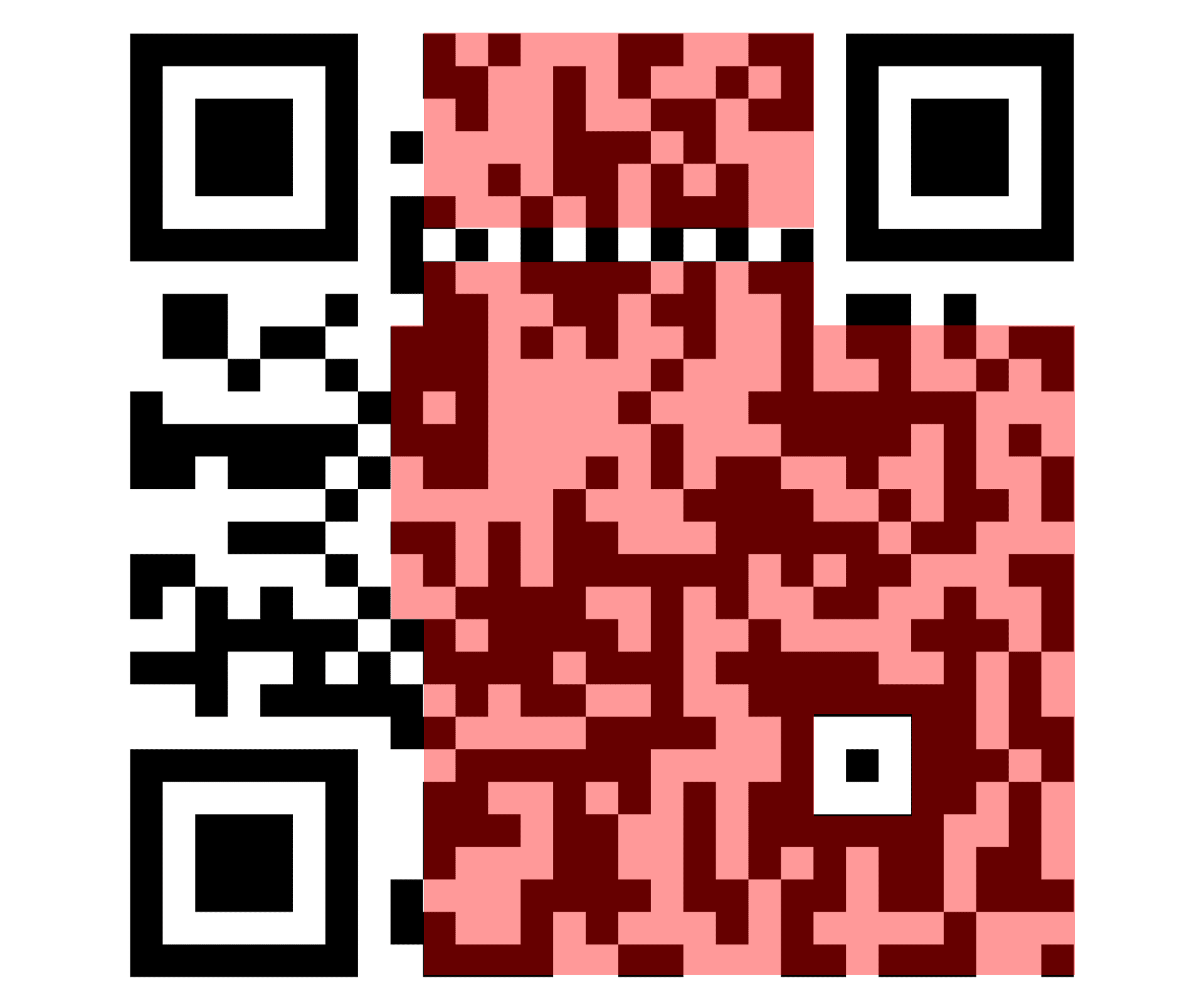
The bulk of the QR code is devoted to the actual data content being stored. The bits start in the bottom right corner and zig-zag upward in two-column strips until the entire data region is filled.
Here's an example of how you'd encode "Hi" into a QR code using binary:
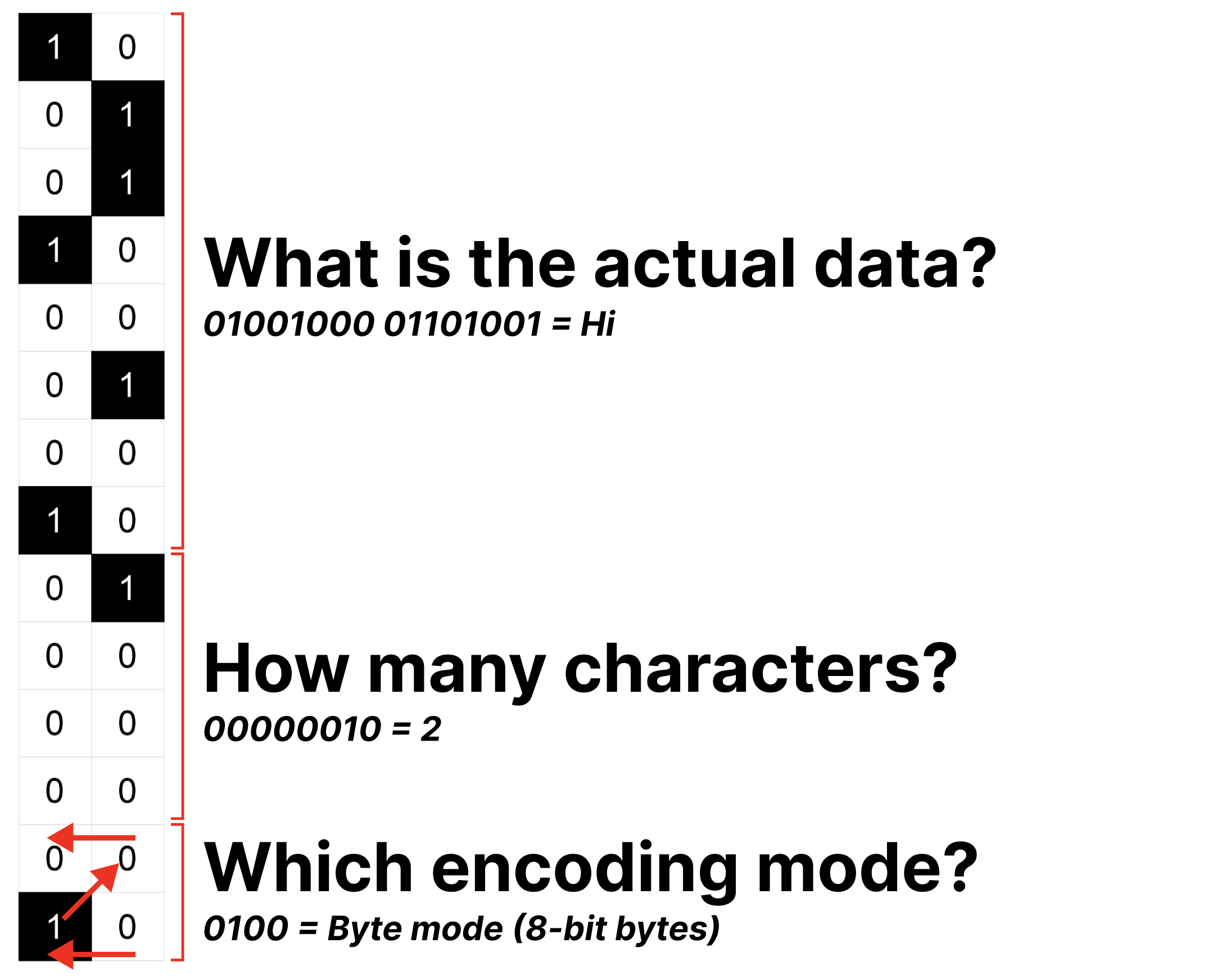
The first four data bits, in the bottom right of the QR code, tell the scanner how to interpret the following modules, or bits. In this example, 0100 means byte mode. The next 8 modules communicate how much data will follow. And then the remaining modules contain the actual data.
🤳🏻⛶𖣯 Other interesting QR code questions
How much data can a QR code contain?
QR codes come in different sizes, or versions, which determine how much data it can store. The smallest version, Version 1, is a 21x21 grid (21² = 441 modules). Each subsequent version adds 4 rows and 4 columns, with a maximum size of Version 40 with a 177x177 grid (177² = 31,329 modules).
The maximum capacity a QR code can hold is roughly 3 KB of data. To put that into perspective, I could fit all the text of this article into a single QR code.
How many QR codes can there be?
While there is a finite number of QR codes, practically speaking we will never run out of QR codes.
The maximum capacity the largest QR code (Version 40) can encode is 23,624 bits of data. Since each bit can be either 1 or 0, the total possible number of unique QR codes is 2²³˒⁶²⁴. I'd type out the full number for you, but 2²³˒⁶²⁴ has 7,112 digits. For comparison, 1 trillion has only 13 digits.
Ironically, that 7,112-digit number could not fit inside a single QR code, as they can only hold a maximum of 7,089 digits.
What are some of the most unique QR codes?
Okay, I just wrote that question because I wanted to share some of the cool QR codes I found in my research. Behold:
A QR code made from a Go board (and a most excellent video explainer!)
Curious about how the world works?
Today You Should Know is a free, weekly email newsletter designed to help you learn something new every Friday.
Subscribe today 👇
Check out some other curious questions:



Sources
Khalpada, S. (2025, May 14). How The Heck Do QR Codes Work?. PerThirtySix. https://perthirtysix.com/how-the-heck-do-qr-codes-work
Kulkarni, S., & Muller, D. (2024, September 30). I built a QR code with my bare hands to see how it works. YouTube. https://www.youtube.com/watch?v=w5ebcowAJD8
More, B. (2025, August 29). QR Code Storage Capacity by Type: Text, Numeric, Alphanumeric, and More. QRcodeChimp. https://www.qrcodechimp.com/qr-code-storage-capacity-guide/
S, E. (2025, June 5). How Much Data Can QR Code Hold?. Uniqode. https://www.uniqode.com/blog/qr-code/how-much-data-can-qr-code-hold
Scandit AG. (n.d.). QR Code. Scandit. https://www.scandit.com/products/barcode-scanning/symbologies/qr-code/
Singh, S. (2026, March 30). How Many QR Codes Are Possible: All You Need To Know. Scanova. https://scanova.io/blog/how-many-qr-codes-are-possible/
Steinkopf-Frank, H. (2022, January 24). Masahiro Hara Takes Aim: The QR Code Inventor Builds Post-Pandemic Applications. Worldcrunch. https://worldcrunch.com/tech-science/qr-code-technology/
Supercode. (2026, March 10). 11 Common Myths About QR Codes Debunked. Supercode. https://www.supercode.com/blog/11-common-myths-about-qr-codes



We Americans sure do like American things.